When an iPhone is SIM locked, it is restricted to a specific carrier. The phone itself may be fully functional, but it may not accept a SIM card from another network until the original carrier unlocks it.
SIM Lock, or carrier lock, is a software restriction applied by a mobile network operator that prevents an iPhone from connecting to unauthorized cellular networks. You can check this status by finding your IMEI number in the device settings and running it through a reliable Apple SIM lock check tool.
SIM Lock on an iPhone, also called a carrier lock, is a software restriction applied by a mobile network operator. It limits the device to a specific cellular network and may prevent it from connecting to SIM cards from other carriers.
You can check an iPhone SIM Lock by opening Settings > General > About and looking for the Network Provider Lock section. You can also use an IMEI-based SIM Lock check to verify the recorded carrier and lock status before buying a used iPhone.
A SIM-locked iPhone may display “SIM Not Supported” when you insert a SIM card from another network. The phone may otherwise be fully functional. This is different from an IMEI blacklist, which can prevent the device from connecting to participating cellular networks altogether.
Buyers of used smartphones face a persistent risk: buying a device tied to a single network. A locked phone means you cannot freely switch providers. It can turn a great deal into unusable hardware if you travel internationally or want to move to a cheaper MVNO such as Mint Mobile or Google Fi. Buying used hardware requires knowing exactly how SIM Lock works and how to verify the status before handing over cash.
What Does SIM Locked Mean on an iPhone?
When an iPhone is SIM locked, it is restricted to a specific carrier. The phone itself may be fully functional, but it may reject a SIM card from another network until the original carrier unlocks it.
A SIM Lock is a carrier restriction, not an Apple ID or iCloud Activation Lock. It also is not the same as an IMEI blacklist. A SIM-locked iPhone may still connect normally to the carrier it is locked to. A blacklisted iPhone may be unable to connect to a participating network even if its SIM Lock status is shown as unlocked.
How Carrier Restrictions Actually Work
Network operators use baseband firmware instructions tied to your iPhone’s unique hardware identifier. These instructions restrict connectivity to their specific cell towers. The activation policy is stored on Apple’s servers and automatically updates the device whenever you insert a new SIM card.
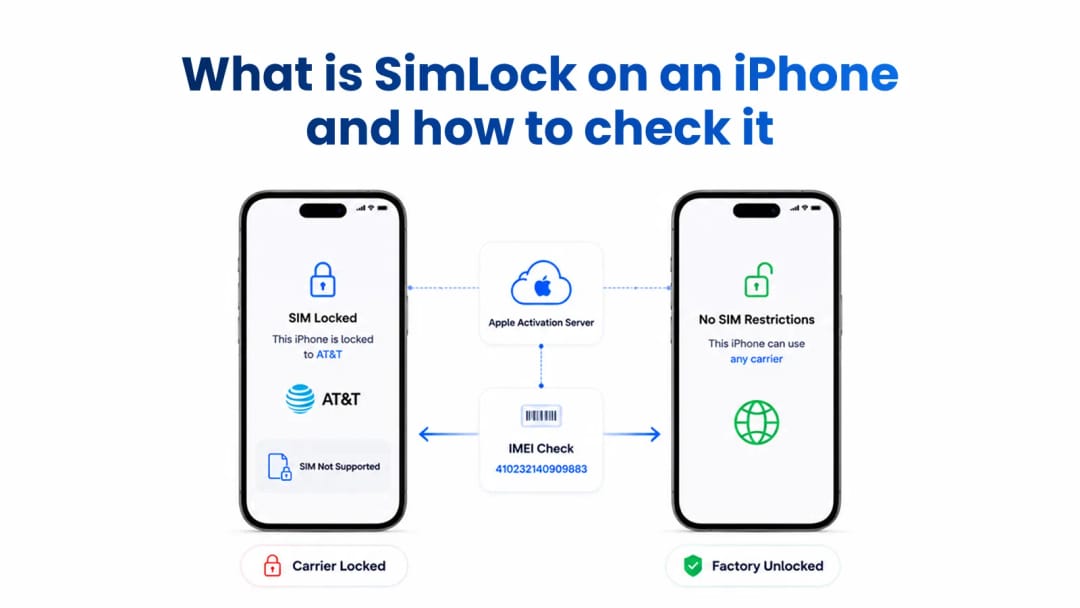
Carriers subsidize new smartphones to lock customers into long-term contracts. When you insert a SIM, the iPhone reads its Integrated Circuit Card Identifier (ICCID). iOS then contacts Apple’s activation servers over the internet to verify the SIM Lock status. If the SIM does not match the allowed network profile, the device blocks the cellular radio from registering. You may see “SIM Not Supported” on the screen.
This mechanism is software-driven but securely anchored to the hardware baseband. Unauthorized software bypasses are highly unstable and may stop working after an iOS update.
Why Are iPhones Locked to Carriers?
Mobile providers in the United States lock smartphones to recover their upfront hardware subsidies. By restricting network access, companies such as AT&T, Verizon, and T-Mobile encourage customers to fulfill their contract terms before moving to a competitor.
The US telecom market relies heavily on postpaid contracts and device financing. The carrier assumes financial risk when a customer buys a premium iPhone with little or no money down. The software lock acts as collateral. Once the device installment plan is paid off and the account is in good standing, the carrier may provide an unlock mechanism according to its policy.
Until then, the original provider retains control over the network policy applied to the device.
How to Check if an iPhone Is SIM Locked
You can check the SIM Lock status on an iPhone directly in iOS. Open Settings, tap General, select About, and scroll to Network Provider Lock.
If the status says “No SIM restrictions,” the iPhone is not SIM locked and can generally be used with compatible networks. If the device shows a carrier restriction or rejects another carrier’s SIM card, confirm the unlock status with the original carrier before completing the purchase.
This internal check is the fastest way to verify an iPhone’s status. Anyone with physical access to the device can complete it in seconds. However, relying solely on the Settings menu may not reveal every restriction. A seller could provide a screenshot from a different device, and local software can sometimes be manipulated temporarily.
For a used iPhone, check the status on the physical device in front of you. A factory-unlocked iPhone should maintain its unrestricted status after future iOS updates and factory resets.
How to Check iPhone SIM Lock by IMEI
An IMEI-based SIM Lock check provides an additional way to verify the device’s recorded carrier and lock status. Depending on the model, carrier, and available database records, an IMEI report may show the original carrier, current SIM Lock status, and related device restrictions.
Always obtain the IMEI from the physical device rather than relying only on a screenshot or a number supplied by the seller. You can find the 15-digit IMEI by opening Settings > General > About, dialing *#06# on the keypad, or checking the original retail box. Match the IMEI shown by the device with the number used for the report.
Running the identifier through an independent IMEI checker can complement the Settings check. It may reveal the recorded activation policy, carrier information, warranty coverage, blacklist status, or financial restrictions available in the relevant database.
At IMEI Best, we see this scam constantly: buyers trust screenshots of the Settings menu or checker websites provided by the seller. Fraudsters can use basic photo editing to make a locked status look clean. Run the check yourself and compare the report with the physical phone.
SIM Lock vs. IMEI Blacklist: What Is the Difference?
Buying a blacklisted smartphone can prevent you from connecting to a participating cellular network, regardless of its SIM Lock status. Carriers share blocklist information for devices reported lost, stolen, or associated with severe fraud or non-payment.
A SIM Lock is a policy-based carrier restriction. It limits an iPhone to a specific network. An IMEI blacklist prevents network registration because the device has been reported or blocked. These restrictions are separate and can exist at the same time.
You might find an iPhone that shows “No SIM restrictions” but still has a blacklisted IMEI. In that case, the phone may be unlocked for other networks but unable to connect to them. Checking the IMEI status before buying is an important way to verify both the SIM Lock and blacklist status.
Feature
SIM Lock
IMEI Blacklist
Managed by
Original mobile carrier and Apple activation policy
Carriers and shared blacklist systems
Main purpose
Restricts the iPhone to one carrier
Blocks a reported or restricted device from network access
Typical cause
Contract, financing, or carrier policy
Loss, theft, fraud, or serious non-payment
Possible result
“SIM Not Supported” with another carrier’s SIM
“No Service” or rejected network registration
How to Check if an iPhone Is SIM Locked Before Buying
Knowing if an iPhone is locked requires matching the physical device details with an independent IMEI report, followed by a live network test.
First, open Settings > General > About and check Network Provider Lock. The preferred result is “No SIM restrictions.” Next, run the IMEI yourself through a reliable checker and review the SIM Lock, blacklist, and financial status fields available in the report.
Finally, insert your own active SIM card from a different carrier during the in-person meetup. Wait for the carrier settings to update, then try to make a call or load a webpage without Wi-Fi. If the call connects and mobile data works, the hardware is compatible with your network. If you see “SIM Not Supported,” an activation error, or a prolonged “Searching” status, ask the original carrier to confirm the status or walk away from the purchase.
Never rely on a seller’s screenshot as the only proof. Check the physical phone, the IMEI, the on-device Network Provider Lock status, and the live SIM result.
Factory Unlocked vs. SIM-Locked iPhone
A factory-unlocked iPhone offers greater network freedom and usually has a higher resale value. A SIM-locked iPhone restricts you to a specific operator and may carry the risk of unresolved financial obligations.
Choosing between them depends on your budget and mobile plans. A restricted device may look cheaper upfront but can severely limit your flexibility later.
Feature
Factory-Unlocked iPhone
SIM-Locked iPhone
Network flexibility
Compatible with compatible networks worldwide
Restricted to one specific provider until unlocked
Resale value
Retains greater market value
Sells for less because of limited network compatibility
Travel convenience
Accepts compatible local prepaid SIM cards abroad
May require roaming or a carrier unlock
Financial risk
Lower risk of carrier restrictions
Higher risk of unresolved contracts or installment plans
How iPhone Carrier Unlocking Works
Apple manages carrier restrictions through a centralized database of Initial Activation Policies and Next Tether Policies. These policies determine which network cryptographic signatures a device can accept.
The iPhone does not control its own permanent SIM Lock status. It acts as a client requesting permission from Apple’s activation servers. When a carrier approves an unlock, it changes the relevant policy on Apple’s servers. The iPhone downloads the new rule during a later activation or restart.
The US Reseller Flex Policy can complicate the situation. Some iPhones bought from major retailers, such as Best Buy, may ship technically unlocked but automatically lock to the first carrier SIM inserted during setup. This can trap buyers who thought they had purchased a fully unlocked device.
On the hardware side, baseband processors handle the physical network negotiation. The iOS kernel strictly separates the baseband memory from ordinary applications. This separation prevents software modifications from permanently erasing a carrier lock without verifiable server-side authorization from Apple. Temporary workarounds using physical interposer SIM chips may stop working after an iOS update.
How to Read SIM Lock Status in an IMEI Report
An IMEI report can contain technical data describing the physical and contractual status of an iPhone. Understanding these fields helps you interpret the device history and avoid expensive mistakes.
How Apple servers verify an iPhone's SIM lock status during a SIM swap.
Data Field
Technical Meaning
Buyer Action Required
SIM Lock Status
Indicates the current network restriction policy
Confirm that the status says “Unlocked” or matches the seller’s description
GSMA Blacklist
Shows whether the device is reported lost, stolen, or blocked
Reject a device marked “Pending” or “Blacklisted”
Initial Carrier
The network provider that originally sold the iPhone
Use it to identify the carrier’s unlock requirements
iCloud Activation Lock
Apple security feature that prevents unauthorized setup
Ensure Activation Lock is off before buying
A SIM-locked iPhone may be perfectly usable with its original carrier, but it is not as flexible as an unlocked device. A blacklisted or financially blocked iPhone may be unusable on the network even if the SIM Lock status appears unlocked.
Before buying, verify the physical Settings page, scrutinize the IMEI report, and perform a live SIM test. This three-step process gives you a much clearer picture of whether the iPhone is truly ready for use.
Conclusion
SIM Lock on an iPhone means that the device is restricted to a specific mobile carrier. You can check the status in Settings > General > About > Network Provider Lock. The most favorable result is “No SIM restrictions.”
For a used iPhone, combine this check with an IMEI-based SIM Lock and blacklist check, then test the phone with your own SIM card. Checking all three sources helps you avoid buying an iPhone that is carrier locked, blacklisted, financially blocked, or unusable on your network.
Frequently Asked Questions
What does SIM Lock mean on an iPhone?
SIM Lock means that an iPhone is restricted to a particular mobile carrier. A SIM card from another carrier may be rejected until the original provider unlocks the device.
How do I check if my iPhone is SIM locked?
Open Settings > General > About and find Network Provider Lock. If it says “No SIM restrictions,” the iPhone is not SIM locked.
Is SIM Lock the same as an IMEI blacklist?
No. SIM Lock restricts the iPhone to a carrier. An IMEI blacklist can prevent the device from registering on participating networks. An iPhone can have one status without having the other, or it can have both.
Can I check iPhone SIM Lock status by IMEI?
An IMEI-based report may show the device’s recorded carrier and SIM Lock status, depending on the available database records. It should be used together with the on-device Network Provider Lock setting and a live SIM test.
What does “No SIM restrictions” mean?
It means the iPhone is not locked to a specific carrier according to the device’s current Network Provider Lock status. The phone must still be compatible with the intended network and have a clean IMEI status.
.webp&w=1080&q=80)