What is iCloud Activation Lock (FMI) and Why Should It Be Checked Separately from IMEI?
iCloud Activation Lock ties Apple hardware directly to a specific Apple ID. Without the original credentials, the device is useless. Buyers frequently check a phone’s IMEI to ensure it works on a cellular network, but an IMEI check alone won't tell you if the phone is software-locked. Buying a used Apple device safely requires a strict two-step verification process: checking the cellular network first, then verifying the internal software lock.
The biggest mistake buyers make on the secondary market is assuming a phone cleared by cellular networks is ready to use, or conversely, obsessing over iCloud while buying a network-banned phone. The problem comes down to isolated databases. Cellular carriers and Apple maintain entirely separate records governing whether a piece of hardware is allowed to function.
How Activation Lock Actually Works
Activation Lock acts as a digital tether. It creates a continuous authentication loop between the physical device and remote Apple servers. When you set up an iPhone and sign in, iOS registers the unique hardware identifiers with Apple. From that moment on, the device demands those exact credentials for any wipe or reactivation.
Apple built this architecture to kill the resale value of stolen electronics. Before this, thieves could simply plug a stolen iPhone into a computer, force an iTunes restore, and wipe the local passcode to get a fresh, resalable phone. Activation Lock moved the validation off-device. Even if someone completely wipes the local storage, the iOS setup wizard stops dead. The device connects to the internet, pings Apple's database, and freezes until it receives the correct email and password.
The protection runs silently in the background. It only reveals itself when the OS is reset or someone tries to disable the Find My feature in the settings. You have to authenticate to prove you actually own the hardware in your hand.
The Firewall Between Telecom and Apple
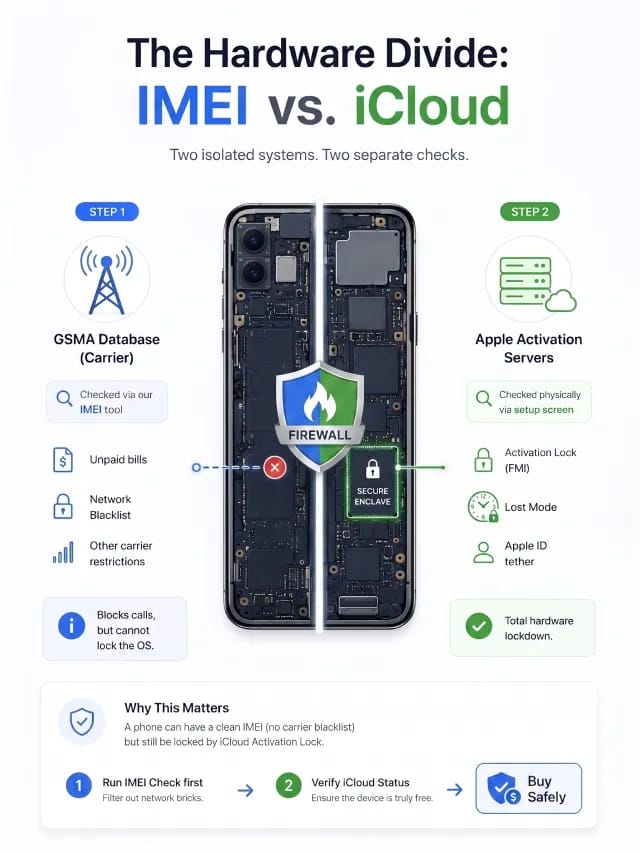
An IMEI check queries global cellular databases. It tells you if a telecom carrier blacklisted the phone for unpaid bills or network theft. It tells you nothing about the internal software lock. A phone can have a flawless network standing while being permanently bricked by an active Apple ID.
Telecom companies and device manufacturers operate in complete silos. Mobile carriers use the GSMA database. If a customer skips their phone bill, the carrier flags the IMEI, and the phone can no longer ping cell towers. However, the carrier cannot touch the phone's operating system. They cannot lock the screen, and they cannot tie the device to an Apple ID.
Apple manages its ecosystem entirely isolated from those cellular networks. A seller might legally own a phone, pay all their bills, and have a clean carrier status. If they sell that device without logging out of iCloud, the phone becomes a glass-and-metal paperweight. The cellular network will accept a new SIM card, but iOS will refuse to bypass the setup screen.
At IMEI Best, we see buyers skip the basics: People worry so much about iCloud that they forget to check the network status. If a carrier blacklists the IMEI, it does not matter if iCloud is clean—the phone will never make a call. Always run the IMEI through our database first to filter out network bricks, then verify the Apple ID status in person.
Under the Hood: The Secure Enclave and albert.apple.com
Apple designed the activation architecture to bypass cellular infrastructure entirely. Authentication handshakes route directly through Apple's encrypted channels during setup. The software lock holds strong whether the device has a SIM card installed or not.
The system doesn't just flip a flag in a cloud database. It hashes the hardware serial number with the user account details and stores cryptographic keys on the Secure Enclave processor inside the logic board. During the "Hello" screen phase, the device executes a verification handshake with a specific server (albert.apple.com). This requires only Wi-Fi and completely bypasses the cellular baseband.
The firewall between telecom and manufacturer systems is absolute. Police and cellular providers have zero administrative tools to override an Apple ID lock. Carrier databases are also notoriously slow, sometimes taking up to 48 hours to sync a blacklist status globally. In contrast, an iCloud status update hits Apple’s servers the exact millisecond a user toggles the switch in the Find My app. Swapping the internal storage chip to bypass the lock also fails. The verification query checks the read-only memory burned directly into the primary processor during factory assembly.
Decoding Server Flags: "Clean" vs. "Lost"
"iCloud Clean" means the activation tether is live and bound to an account, but the owner hasn't actively reported the hardware as missing. "iCloud Lost" confirms the owner explicitly triggered the remote security protocol. They broadcasted a distress signal that permanently flags the hardware and locks the screen with a custom recovery message.
Knowing the difference dictates whether a used phone is salvageable. A Clean status is often just negligence. An honest seller might wipe their phone from the general settings without signing out of their profile first. The device resets, but Apple's servers retain the lock. In this scenario, the seller can simply log into iCloud on a browser and remove the device remotely.
A Lost status is a severe escalation. It requires deliberate action. The owner has to log into their dashboard, select the specific hardware, and trigger Lost Mode. This suspends Apple Pay cards and locks the screen.
Feature Category | iCloud Status: Clean | iCloud Status: Lost |
Owner Action | No active report filed. | Explicitly marked as missing. |
Account Tethering | Bound to an Apple ID. | Bound to an Apple ID. |
Screen Notification | Standard setup or activation lock screen. | Custom message and phone number. |
Resolution | High, if the seller forgot to log out. | Zero. Avoid the purchase. |
Apple Support | May assist with original purchase receipts. | Strictly refuses unlocking assistance. |
Seeing a Lost status during a transaction is a giant red flag. It heavily implies you are holding stolen property.
The Correct Two-Step Methodology for Buying Safely
A safe purchase requires passing two distinct checks. You must rule out a cellular blacklist first, and then confirm the software lock is off. Do not reverse this order. There is no reason to spend time checking iCloud on a phone that carriers refuse to activate.

Step 1: The Network Filter (GSMA Database)
Getting the IMEI is straightforward. On an active device, open the Phone app and dial *#06#. If the phone is on the setup screen, tap the 'i' icon to display hardware identifiers. On SIM-equipped models, you can also physically inspect the SIM card tray, where the IMEI is laser-etched directly onto the metal.
Once you have the IMEI, submit the identifier into our checker. We immediately query global GSMA registries to ensure the hardware is free of financial disputes or reported network theft. If this report comes back flagged, walk away. The phone is a network brick.
Step 2: The Physical Software Verification
If our checker confirms a clean network status, your next step is verifying the Activation Lock. Since Apple isolated its servers, the most foolproof method is a hands-on check during the transaction.
Never trust screenshots.Ask the seller to navigate to Settings > General > Transfer or Reset iPhone > Erase All Content and Settings and execute a full erasure right in front of you. Wait for the reboot. If the phone reaches the "Hello" screen, connects to Wi-Fi, and activates without asking for the previous owner's Apple ID and password, the hardware is completely free and safe to buy.
Suggestion for you

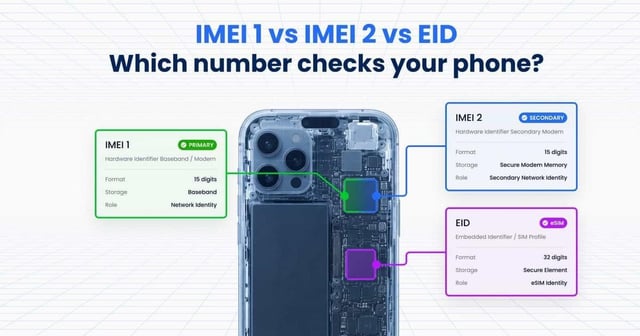
IMEI 1 vs IMEI 2 vs EID Which Number Should You Use to Check Your Phone
Compare smartphone identifiers. Learn why IMEI 1 is vital for GSMA & SimLock checks, and why you need both IMEI 2 and an EID number for eSIM activation.
Read moreJul 15, 2026
"Invalid IMEI" Error. 5 Reasons Why Your IMEI Number Is Not Recognized
Wondering why is my IMEI not valid? Learn 5 reasons for invalid errors like MEID mix-ups or clones, and learn how to check IMEI verification accurately.
Read moreJul 20, 2026
Can Someone Track or Hack Your Phone Using Only the IMEI Number?
Wondering if an IMEI number can be tracked? We debunk common mobile tracking myths and explain why using an online IMEI checker is 100% safe.
Read moreJul 23, 2026