Cross-Border Phone Resale - How to Use an IMEI Report
Cross-Border Device Resale — What to Consider
Buying or reselling a device from another country carries additional risks. Phones with the exact same marketing name (for example, iPhone 15) can have significant hardware differences depending on the market they were manufactured for. Here is how to use a basic IMEI report for international transactions:
Step 1. Check the variant code and hardware features Never rely solely on the general name of the phone. Pay attention to the exact variant code in the report. Depending on the market, the same model can have critical physical differences. For example, modern iPhones for the US market are manufactured without a physical SIM card tray at all (eSIM only), while versions for China support two physical SIM cards but do not work with eSIM. The exact variant code will help you avoid such unpleasant surprises.
Step 2. Review supported network bands This is the most important point when buying from abroad. A phone that works perfectly in Asia or the US might not support the necessary 4G/5G frequencies used by your local carrier. The report shows the device's factory network specifications. Always verify these bands against your carrier's frequencies before purchasing.
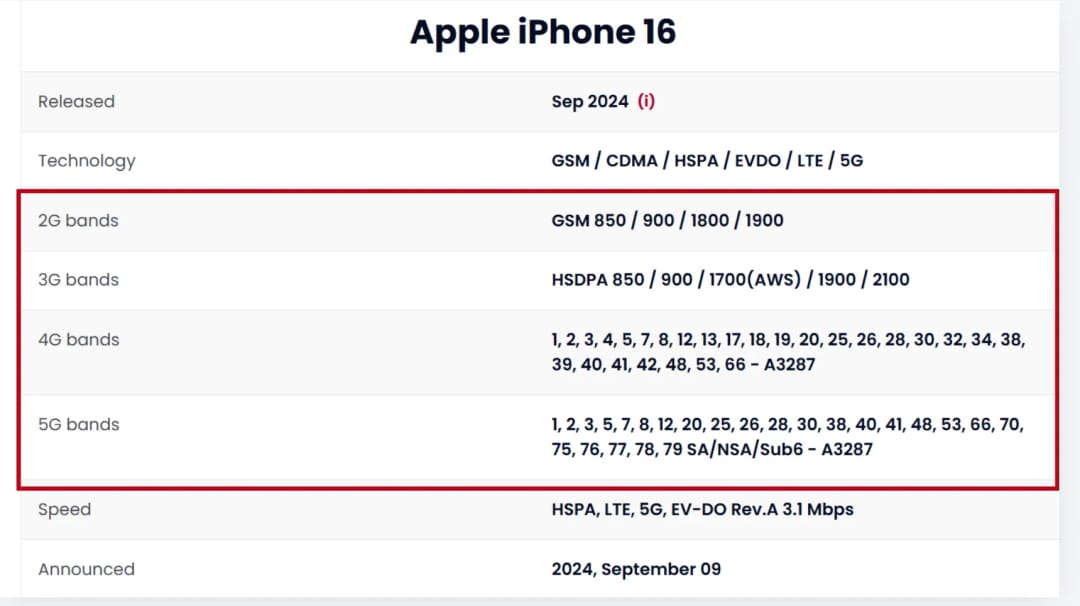
Caption: The Network Bands section shows the specific cellular frequencies the device was built to support. Always verify these against your local carrier's requirements.
Step 3. Consider warranty limitations A common misconception is that manufacturer warranties apply worldwide. If the report shows an active warranty (Active), remember: it usually applies only in the country of original purchase. A local authorized service center has every right to refuse free repair for a device brought in from abroad.
What an IMEI report will NOT tell you The report only provides technical data from the manufacturer. It will not help you determine:
- Customs regulations and import requirements.
- Taxes and import duties.
- The legality of using a specific device in your country.
Be transparent when reselling: use IMEI data to honestly describe the device variant, but do not make false promises to buyers about local network compatibility or international warranty coverage.
Suggestion for you
What Is an IMEI Number and How Can You Find It
Learn what an IMEI number is, how to find it with *#06# or device settings, what an IMEI check reveals, and how to verify a used phone before buying.
Jun 19, 2026
What Is the GSMA Blacklist? How Does the GSMA IMEI Check Work?
Learn what the GSMA blacklist and GSMA IMEI database are, why phones are blocked, how blacklist status spreads across carriers, and how to check an IMEI before buying.
Jun 22, 2026
Buying a Used Phone — What to Check Before Purchase
Planning to buy a used phone? Follow our essential pre-purchase checklist to verify IMEI, check network bands, avoid blacklisted devices, and test in person.
Oct 27, 2026